
Monday.com CRM and No-Code Automation Services
What is Monday.com?
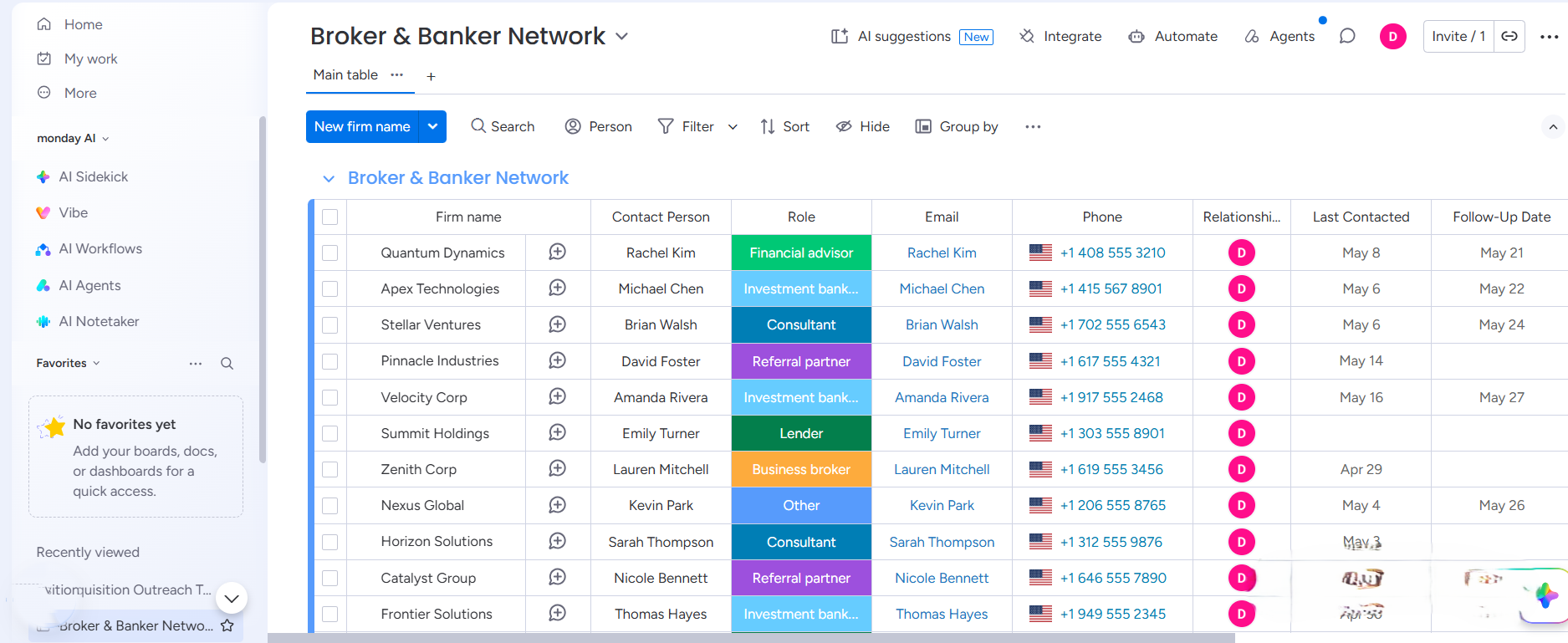
Monday.com is one of the most flexible and visual work operating systems available. It unifies your projects, tasks, clients, and communications into one central dashboard, making it perfect for teams that want to eliminate manual work, automate processes, and scale efficiently.
Why use Monday.com?
-
Everything in one place
Projects, clients, tasks, deadlines and communication all live in one workspace your whole team can see.
-
Automation that actually works
Monday.com has a built-in automation engine that handles notifications, assignments, status changes and approvals.
-
Connects to the tools you already use
Gmail, Slack, HubSpot, Xero, Salesforce and hundreds more.
-
AI built right into your workflow
Monday Sidekick and Vibe AI summarize updates, suggest next steps, draft content and surface insights directly inside your boards.
-
Scales with your business
Whether you have 3 people or 300, Monday.com grows with you. Add teams, boards, automations and dashboards without rebuilding anything from scratch.
What we build with monday.com
Custom Notifications
The right alert goes to the right person at the right time. No more missed updates, no more manual chasing and no more things falling through the cracks.
Dependencies and Timelines
Task B cannot start until Task A is done. Deadlines cascade automatically. Your team always knows what is next without anyone having to tell them.
AI Columns
AI summarises board updates, suggests next actions and generates content directly inside Monday.com. Your team thinks less about admin and more about results.
Client Portals
Give clients a branded, real-time view of their project without ever giving them access to your internal workspace. Clean, professional and fully automated.
Cross-Board Dashboards
Every team, every project and every KPI visible in one executive dashboard that pulls live data from every board and updates itself in real time.
App Integrations
We connect Monday.com to Gmail, Slack, HubSpot, Xero, WhatsApp and more so data flows between your tools without anyone moving it manually.
CRM and Lead Management
Turn Monday.com into a fully functional CRM. Leads come in, get assigned, move through stages and trigger follow-ups without your team touching a thing.
Recurring Task Automation
Weekly reports, monthly reviews, regular client check-ins. Set them once and Monday.com handles them on schedule every single time.
Common Use Cases
Estimate Your Project
Drag the slider to match your estimated target budget allocation, then lock it in to start the conversation honestly.
Kelly literally saved my sanity this week. We’ve been paying for Monday for like 6 months and literally nobody on the team was using it because the layout was too confusing. She jumped on a call, archived all the junk boards we didn't need, and set up a super simple tracking view for our daily tasks. The team is actually using it now.
Marcus T
Honestly I was dreading moving all our old client spreadsheets and folders over because I thought stuff would get lost or messed up in the transition. Host & Flow handled the whole migration over a weekend. We logged in on Monday morning and everything was just sitting there organized in the new boards. So much easier than doing it ourselves.
Sarah J
We are a pretty small startup and we don't have a tech guy on staff to write code for us. We just wanted our website contact form to automatically pop up as a task on our board so we could stop manually typing everything in every morning. Kelly set that up in like two seconds. Simple but saves us a ton of time.
David K
I am completely useless with software and usually hate changing systems, but Kelly made the whole transition really easy. She didn't overwhelm us with a bunch of advanced features we didn't need, just built us a clean place to drop our project files and track deadlines. Highly recommend Host & Flow if you are stuck.
Sydney H
Our old process was literally just writing things down in email folders and it worked fine when we were small, but we started dropping the ball once we took on more clients. Host & Flow built a workflow that automatically alerts the team when an account is stalling or needs a follow-up. It's stopped things from slipping through the cracks while we grow.
Rosemary T
Our Process
FAQ
Is my data safe on Monday.com?
Yes, your data is exceptionally safe on Monday.com. The platform is built on enterprise-grade security infrastructure that meets strict global standards, including ISO 27001, ISO 27018, SOC 1, SOC 2 (Type II), and GDPR compliance. All data is fully encrypted both while moving across the web (in transit) and while sitting on their secure cloud servers (at rest). Furthermore, you maintain strict operational control over your data. Inside your workspace, we configure precise, granular user permissions. This ensures your team members, contractors, or external guests can only view and edit the specific boards and columns necessary for their roles, keeping your sensitive company data completely secure.
Can I migrate my data from Monday.com to another tool later if I need to?
You are never locked in; your operational data belongs entirely to you. Monday.com allows you to export entire boards, subitems, and filtered views into Excel (.xlsx) files with a single click. Additionally, because Monday.com has an open API, your underlying data can be programmatically backed up or synced to external cloud drives or other software platforms using integration engines like Make.com and Zapier. Your system is built for flexibility, not restriction.
Why is Monday.com so confusing to set up if it's advertised as a 'no-code' platform?
While Monday.com doesn’t require software coding, it does require a deep understanding of database architecture and process mapping. When businesses rely on generic pre-made templates, they quickly realize the boards don’t fit their actual real-world team logistics or multi-tool pipelines. It becomes confusing because a system must be strategically engineered around your specific operational workflows to actually be useful.
Can I migrate my existing data from Excel or Google Sheets to Monday.com?
Yes, you can migrate your historical data from Excel or Google Sheets directly into Monday.com. Monday features a built-in spreadsheet importer that converts your rows into dynamic items and your columns into structured data fields. However, simply uploading a messy sheet will result in a messy workspace. For clean operational workflows, your data should be cleaned, mapped, and restructured during the transition so your historical records align perfectly with your new automated system.
What is Monday.com?
Monday.com is a highly customizable Work OS (Work Operating System). While you can track simple tasks, its true power lies in centralizing your entire business infrastructure. It acts as a single source of truth where you can visually track project pipelines, manage team workloads, automate manual administrative work, and see high-level business performance dashboards in real-time.
Is Monday.com a CRM, a project manager, or an AI tool?
Monday.com can be all three, depending entirely on how you configure it. By default, it is a highly flexible project and workflow management system. However, you can build or restructure it into a fully functioning Sales CRM to track leads and clients, or deploy its native AI features to summarize updates and generate task blocks. Because it is completely modular, we design your workspace to function exactly as your business requires.
